



- Stock: Out Of Stock
- Brand: Koorui
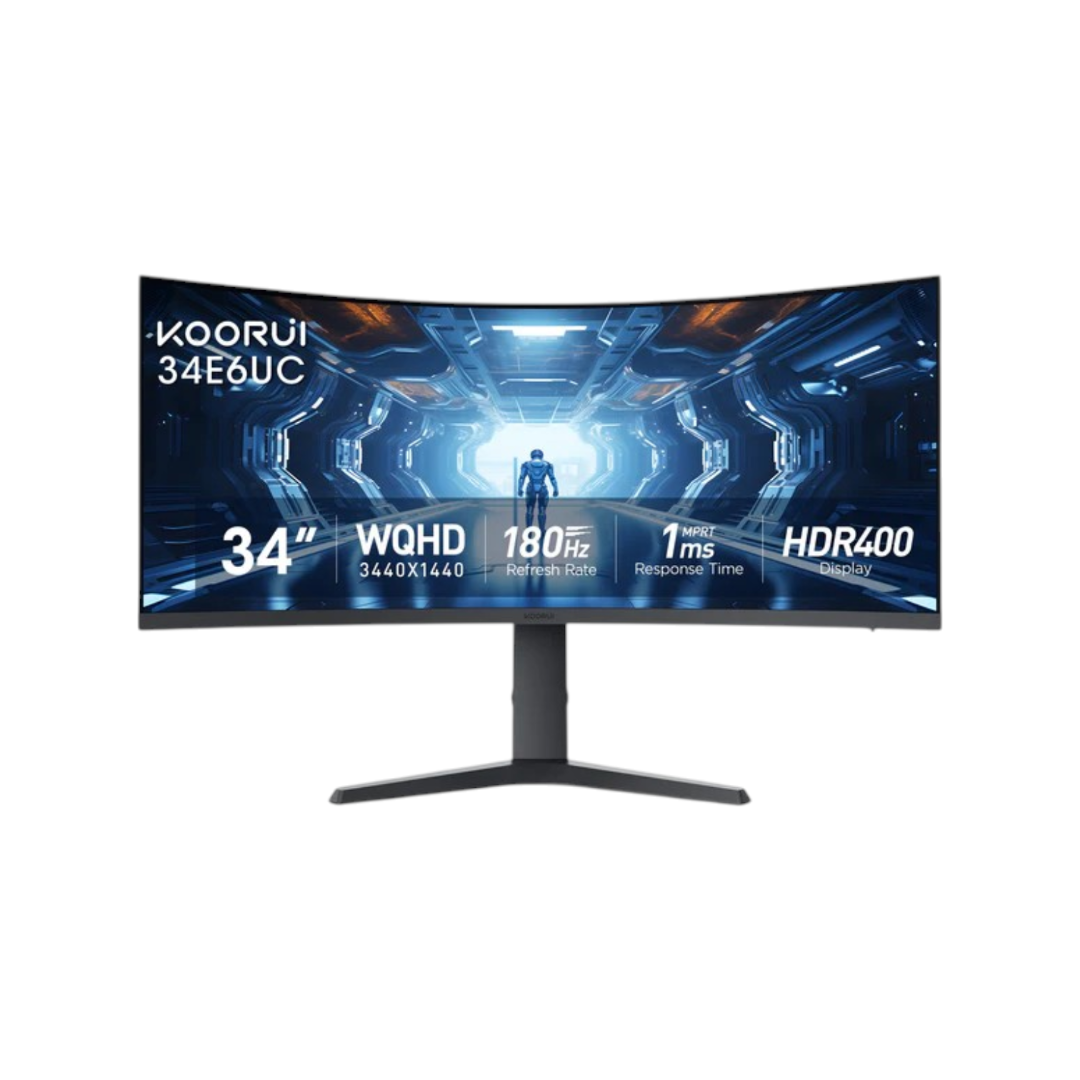
- Model: 34E6UC
TBA
Out Of Stock
Key Features
- Model: 34E6UC
- 90% DCI-P3, lifelike color
- Dark Field Control & Game Mode
- Black Equalizer
- Picture-by-Picture
- Picture-in-picture
- Ergo stand: tilt, swivel, height

| Display Features | |
| Aspect Ratio | Aspect Ratio |
| Brightness | 400 cd/㎡ |
| Color Gamut | 100% sRGB, 90% DCI-P 8Bit Color Support |
| Color Support | 16.7M |
| Contrast Ratio | 3000:1 |
| Curvature | Flat |
| Display Size | 34 inch |
| Display Type | LED |
| HDR | HDR400 |
| Panel Type | VA |
| Resolution | WQHD (3440x1440) |
| Response Time | 1ms(GTG) |
| Viewing Angle | 178° |
| Video Features | |
| Flicker Free | Yes |
| Free Sync Support | Yes |
| G-Sync Support | Yes |
| Low Blue Light | Yes |
| Connectivity | |
| Display Port | 1x DisplayPort 1.4 |
| Interface | |
| HDMI | 2x HDMI 2.0 |
| Power | |
| Voltage | 19V3.42A |
| Audio Technology | |
| Speaker (Built In) | N/A |
| Mechanical Design | |
| Vesa Wall Mount | 75x75mm |
| Tilt | -5~20° |
| Physical Specification | |
| Color | Black |
| Dimension | 797.53 x 535.40 x 242.18 mm |
| Weight | Weight without Package 8Kg, 17.64 lbs |
| Warranty Information | |
| Warranty | 03Years |
KOORUI 34E6UC 34-inch monitor: Is This Budget Ultrawide Worth It?
The KOORUI 34E6UC is a 34-inch curved gaming monitor built around a VA panel, WQHD resolution, and a 180Hz refresh rate. It's positioned as an entry point into ultrawide gaming without the price tag of OLED or higher-end IPS alternatives. This guide covers every core spec, explains what each one means in practice, and lays out who the monitor fits and who it doesn't so you can decide whether it belongs on your shortlist.
What is the KOORUI 34E6UC?
The KOORUI 34E6UC is a 34-inch, 21:9 curved gaming monitor with a 3440x1440 WQHD resolution, a VA panel, a 180Hz refresh rate, and a 1000R curve. It's manufactured by KOORUI, a budget-display brand under China's HKC Group one of the world's larger LCD panel producers. The 34E6UC targets buyers who want the immersion of an ultrawide screen and smooth gaming performance without paying OLED prices. It launched as a value-focused alternative to pricier 34-inch ultrawide from brands like Samsung, LG, and Dell. Note that KOORUI also sells 180Hz and 240Hz variants of the 34E6UC line under the same model name in some markets. This guide focuses on the widely available 180Hz VA configuration, since that's the version most retailers list under "34E6UC WQHD 34-inch VA 165Hz.
Quick Answer
The KOORUI 34E6UC is a 34-inch VA curved gaming monitor with a 3440x1440 (WQHD) resolution, 1000R curvature, 180Hz refresh rate, and 1ms MPRT response time. It supports freeSync Premium and is G-Sync compatible, includes HDR400, and typically sells for around 40,000-42,000 BDT. It suits budget-conscious gamers who want ultrawide immersion but isn't built for color-critical professional work.
Who Should Buy the KOORUI 34E6UC?
This monitor fits well for:
- Budget-conscious gamers who want a 34-inch ultrawide experience without paying 50,000 BDT.
- Competitive and casual gamers alike who value a 165Hz refresh rate and 1ms MPRT for smoother motion.
- First-time ultrawide buyers curious about the format before committing to a pricier panel.
- Hybrid users who split time between gaming and everyday productivity, thanks to picture-in-picture and picture-by-picture modes.
- Console gamers with HDMI 2.0-compatible devices looking for a large secondary or primary display.
Design and Build Quality
KOORUI describes the 34E6UC's design language as an Eagle Wing" aesthetic — an angular stand base intended to evoke a wing shape. The chassis is matte black plastic with a mostly bezel-thin front profile. Build quality at this price generally reflects the budget-monitor segment: functional and sturdy enough for daily use, without premium materials like aluminum stand arms or glass-finish backs. Reviewers have generally described the stand as more solid than expected given the price point, offering tilt, swivel, and height adjustment out of the box.
Display Quality: Resolution, Color, and Curvature
The KOORUI 34E6UC delivers a sharp, immersive image thanks to its 3440x1440 resolution and unusually tight 1000R curve, though its VA panel and 90–95% DCI-P3 coverage mean it isn't built for color-critical work. The 3440x1440 resolution gives roughly 30% more horizontal screen real estate than a standard 16:9 QHD monitor, which is useful for multitasking, simulation and strategy games, and cinematic aspect-ratio content. The 1000R curvature is tighter than the 1500R or 1800R curves common on most 34-inch ultrawide. A lower "R" number means a steeper curve 1000R approximates a 1-meter viewing radius. This makes the screen edges feel closer to your peripheral vision, which some users find more immersive and others find more pronounced when sitting close to the display. VA panels like the one used here are known for strong static contrast (deep blacks) but comparatively slower pixel transitions than IPS or OLED, especially in dark-to-dark color shifts. This is the primary trade-off buyers should expect.
Who Should Avoid It?
It's a weaker fit for:
- Color-critical professionals — photographers, video editors, and print designers who need consistent, factory-calibrated color accuracy and wide gamut coverage beyond DCI-P3 90–95%.
- Buyers who want true HDR — HDR400 is an entry-level HDR tier without local dimming, so contrast gains are limited compared to mini-LED or OLED displays.
- Users needing USB-C or a USB hub — the 34E6UC doesn't include either, which matters for single-cable laptop setups.
- Anyone sensitive to VA smearing — VA panels can show slight motion blur ("smearing") in dark transitions, more noticeable than on fast IPS or OLED panels.
- Buyers wanting portrait orientation — the stand doesn't pivot the panel 90 degrees.
Display Quality: Resolution, Color, and Curvature
The KOORUI 34E6UC delivers a sharp, immersive image thanks to its 3440x1440 resolution and unusually tight 1000R curve, though its VA panel and 90–95% DCI-P3 coverage mean it isn't built for color-critical work. The 3440x1440 resolution gives roughly 30% more horizontal screen real estate than a standard 16:9 QHD monitor, which is useful for multitasking, simulation and strategy games, and cinematic aspect-ratio content. The 1000R curvature is tighter than the 1500R or 1800R curves common on most 34-inch ultrawide. A lower "R" number means a steeper curve. 1000R approximates a 1-meter viewing radius. This makes the screen edges feel closer to your peripheral vision, which some users find more immersive and others find more pronounced when sitting close to the display. VA panels like the one used here are known for strong static contrast (deep blacks) but comparatively slower pixel transitions than IPS or OLED, especially in dark-to-dark color shifts. This is the primary trade-off buyers should expect.
Gaming Performance: Refresh Rate, Response Time, and Adaptive Sync
A 165Hz refresh rate paired with FreeSync Premium and G-Sync compatibility makes the 34E6UC capable of smooth, mostly tear-free gaming, though the 1ms figure is an MPRT rating rather than true gray-to-gray response time. 165Hz allows up to 165 frames per second to be displayed, which noticeably reduces motion blur and input lag compared to standard 60Hz or 75Hz monitors useful in fast-paced shooters, racing games, and competitive titles. The advertised "1ms" response time is measured using MPRT (Moving Picture Response Time), a metric that differs from the gray-to-gray response time more commonly used to rate faster IPS and OLED panels. In practical terms, VA-based MPRT ratings tend to show more visible motion blur in dark scene transitions than the number alone suggests this is a known, documented limitation of VA panel technology rather than something specific to this model. FreeSync Premium support and G-Sync compatibility mean the monitor can synchronize its refresh rate with a compatible AMD or NVIDIA GPU's frame output, reducing screen tearing and stutter during variable frame-rate gameplay.
HDR Performance: What HDR400 Really Means
HDR400 is the entry-level tier of the VESA DisplayHDR certification, requiring a peak brightness of 400 nits but no local dimming so while it can technically decode HDR signals, it does not reproduce the strong contrast or brightness range of higher HDR tiers. For context, VESA's DisplayHDR standard scales upward through tiers such as HDR400, HDR500, HDR600, HDR1000, and beyond, with local dimming zones and higher peak brightness required at each step up. HDR400 monitors are generally best understood as "HDR-compatible" rather than delivering a transformative HDR viewing experience. Buyers expecting console- or premium-TV-level HDR should treat this as a checkbox feature rather than a headline selling point.
Connectivity and Ports
The 34E6UC includes:
- 1x DisplayPort (1.4 or 1.2, depending on listing/batch)
- 2x HDMI 2.0
This is enough to run a PC and a console simultaneously, or two source devices via picture-by-picture mode. It notably lacks USB-C, USB-A hub ports, and built-in speakers, so external audio and any USB peripherals need to be connected directly to your PC or console rather than through the monitor.
Ergonomics and Stand Adjustability
The stand supports:
- Tilt: -5° to 20°
- Swivel: -15° to 15°
- Height adjustment: up to 110mm
- VESA mounting: 75 x 75mm (compatible with standard monitor arms)
There is no pivot function, so the panel cannot rotate into portrait orientation. For most gaming and general productivity use, the available range covers typical desk setups comfortably.
Software Features (PIP, PBP, Black Equalizer, and More)
The 34E6UC includes several on-screen-display features common to budget-to-midrange gaming monitors:
- Picture-in-Picture (PIP) and Picture-by-Picture (PBP): Display two input sources at once — useful for monitoring a console feed while working on a PC, for example.
- Black Equalizer / Dark Field Control: Brightens shadow detail without overexposing the rest of the image, intended to help spot enemies in dark game areas.
- Crosshair overlay: An on-screen aiming reticle for games that lack one, aimed at first-person shooter players.
- Timer function: An on-screen countdown/count-up display useful for real-time strategy or speedrun-style play.
- Game Mode presets: Picture presets tuned for different genres (FPS, RTS, and similar).
- Flicker-free backlight and low blue light mode: Eye-comfort features intended to reduce strain during long sessions.
Is the KOORUI 34E6UC Worth the Money?
At its typical 42,000- 45,000 street price, the KOORUI 34E6UC is a reasonable value pick for gamers who want ultrawide immersion and a fast refresh rate on a tight budget, provided they accept VA panel trade-offs and skip-level HDR performance. Independent reviews have generally landed on a similar conclusion: it's a competent, budget-appropriate ultrawide rather than a class-leading one. PC Gamer's review of the monitor described it as immersive but noted the panel technology and motion handling are "ever so slightly sluggish" compared to pricier alternatives, while still calling it a lot of monitor for the money. TweakTown's review scored it 78%, noting it covers the fundamentals of ultrawide gaming well at a low price point. These assessments align with the spec sheet: strong on size, resolution, and price; more modest on panel-level performance.
How to Set Up the KOORUI 34E6UC
- Unbox and inspect the panel. Lay the screen face-down on a soft, clean surface to avoid scratches before attaching the stand. Why: prevents accidental panel damage during assembly. Expected result: an undamaged screen ready for stand attachment.
- Attach the stand neck and base using the included screws. Why: the stand ships partially disassembled to reduce shipping box size. Expected result: a stable base supporting the panel.
- Connect video cables (DisplayPort recommended for full 165Hz; HDMI 2.0 also supports high refresh rates depending on your GPU). Why: DisplayPort typically offers the most reliable full-bandwidth connection for high refresh WQHD signals. Expected result: a stable image at your GPU's native output resolution.
- Connect the external power adapter. Why: the monitor uses an external brick rather than an internal power supply. Expected result: the monitor powers on and displays the KOORUI splash screen.
- Set the correct resolution and refresh rate in your OS or GPU control panel (3440x1440 @ 165Hz). Why: some systems default to a lower refresh rate or resolution on first connection. Expected result: full native resolution and refresh rate confirmed in display settings.
- Enable FreeSync/G-Sync in your GPU driver settings if you want adaptive sync active. Why: adaptive sync isn't always enabled by default. Expected result: reduced screen tearing during variable frame-rate gameplay.
- Adjust tilt, swivel, and height to a comfortable eye-level position. Why: proper ergonomics reduce neck and eye strain over long sessions. Expected result: a viewing angle that keeps the top of the screen at or slightly below eye level.
Common Mistakes to Avoid
- Not enabling adaptive sync in the GPU driver, leading to unnecessary screen tearing despite owning a FreeSync/G-Sync-capable monitor.
- Expecting OLED-level HDR from an HDR400-certified panel, which can lead to disappointment that isn't really a product defect.
- Running the monitor at a default 60Hz or 100Hz setting by not manually selecting 165Hz in display settings after setup.
- Ignoring the 30-day return window — since VA panels can occasionally ship with dead pixels or backlight bleed, testing the unit early protects your return eligibility.
- Mounting a VESA arm without checking weight ratings, since ultrawide panels are heavier than standard 24–27-inch monitors.
Buying Advice
Because KOORUI sells multiple 34E6UC variants (165Hz, 180Hz, and 240Hz versions have all appeared across regions and retailers), always confirm the exact refresh rate, DisplayPort version, and color gamut percentage listed on the specific product page or box before buying — retailer listings for nominally the same model number have shown minor spec differences between production batches. Buying from a retailer with a clear return policy (30 days is common) is worth prioritizing, since panel uniformity and dead-pixel risk are a known consideration with budget VA monitors.
FAQs
What resolution does the KOORUI 34E6UC support?
It supports a native 3440x1440 WQHD (UWQHD) resolution at a 21:9 aspect ratio.
Is the KOORUI 34E6UC good for gaming?
Yes, for the price. Its 180Hz refresh rate and FreeSync Premium/G-Sync compatibility support smooth, largely tear-free gameplay, though VA panel motion handling is a step behind IPS or OLED alternatives.
Does the KOORUI 34E6UC support G-Sync?
It's listed as G-Sync compatible, meaning it works with NVIDIA's adaptive sync technology on compatible GPUs, though it isn't officially NVIDIA G-Sync certified with a dedicated module.
What panel type does the KOORUI 34E6UC use?
A VA (Vertical Alignment) panel, known for strong static contrast but slower pixel response than IPS or OLED panels.
Is HDR400 good on this monitor?
HDR400 is the entry-level DisplayHDR tier and lacks local dimming, so it offers limited HDR benefit compared to higher tiers like HDR600 or OLED-based HDR.
Does the KOORUI 34E6UC have speakers?
No built-in speakers are included; external speakers or headphones are required.
Does it support USB-C?
No, the 34E6UC's ports are limited to DisplayPort and HDMI; there's no USB-C or USB hub.
Can the KOORUI 34E6UC rotate to portrait mode?
No, the stand supports tilt, swivel, and height adjustment, but not pivot/portrait rotation.
What is the response time of the KOORUI 34E6UC?
It's rated at 1ms MPRT, a moving-picture response time metric rather than a traditional gray-to-gray rating.
How much does the KOORUI 34E6UC cost?
Pricing has generally ranged from around 41000 to 42000 BDT in the BD, depending on retailer and promotions.
Who makes KOORUI monitors?
KOORUI is a budget-focused display brand under China's HKC Group, a major LCD panel manufacturer.
Is the KOORUI 34E6UC better than the Samsung Odyssey G5?
Specs are similar (VA, 3440x1440, 165Hz, 1000R), but the Samsung carries a more established brand reputation and typically costs more; the KOORUI competes primarily on price.
Does the KOORUI 34E6UC support FreeSync?
Yes, it supports AMD FreeSync Premium.
What's the warranty on the KOORUI 34E6UC?
KOORUI typically offers a 3-year manufacturer warranty, though exact terms vary by region and retailer.
Is 1000R curvature better than 1500R for a 34-inch monitor?
Neither is objectively "better" — 1000R is a tighter curve that some users find more immersive, while 1500R (more common on 34-inch monitors) is gentler and can feel more natural at typical desk viewing distances.
It's a matter of personal preference.
What color gamut does the KOORUI 34E6UC cover?
Listings vary between roughly 90% and 95% DCI-P3 and around 100% sRGB, likely reflecting minor panel batch differences.
Can I use the KOORUI 34E6UC with a PS5 or Xbox?
Yes, via its HDMI 2.0 ports, though console output will be limited by the console's own maximum supported refresh rate and resolution combination.
Is the KOORUI 34E6UC suitable for office work?
Yes — its resolution and screen size support multitasking well, though its color accuracy isn't tuned for print or photo-editing precision work.
What's the biggest downside of the KOORUI 34E6UC?
The VA panel's motion handling in dark scene transitions and the entry-level HDR400 certification are the most consistently cited limitations across reviews.
Will future KOORUI monitors improve on the 34E6UC?
KOORUI has already released 180Hz and 240Hz variants of the 34E6UC line, suggesting the brand continues to iterate toward faster refresh rates within the same form factor.
What is the price of KOORUI 34E6UC WQHD 34-inch VA 180Hz Curved Gaming Monitor in Bangladesh 2026?
The latest price of KOORUI 34E6UC WQHD 34-inch VA 180Hz Curved Gaming Monitor in Bangladesh is 42,000৳. You can buy the KOORUI 34E6UC WQHD 34-inch VA 180Hz Curved Gaming Monitor at best price from our website or visit any of our showrooms to make your purchase